The Ubiquity of WordPress and the Elementor Ecosystem
WordPress powers more than 40 percent of the web, a staggering figure that makes it the primary operating system for small business websites, large enterprise blogs, and e-commerce storefronts worldwide. A significant portion of this market dominance can be attributed to page-builder plugins, which democratized web design by replacing complex code with drag-and-drop interfaces. Sitting at the top of this ecosystem is Elementor, a powerhouse plugin active on over 16 million websites.
Because of its massive reach, any vulnerability within Elementor represents a widespread systemic risk for the broader web ecosystem. Security researchers routinely scrutinize the platform, searching for flaws before malicious actors can exploit them at scale. Recently, details surfaced regarding a severe cross-site request forgery (CSRF) flaw in the plugin, highlighting once again the dangers inherent in managing complex web applications through browser-based administrative panels.
This newly disclosed flaw allows unauthenticated remote attackers to manipulate authenticated sessions, effectively granting bad actors full administrative privileges over a vulnerable WordPress site. All it takes is a single careless click from an logged-in administrator.
Unpacking the CSRF Flaw: How the Attack Works
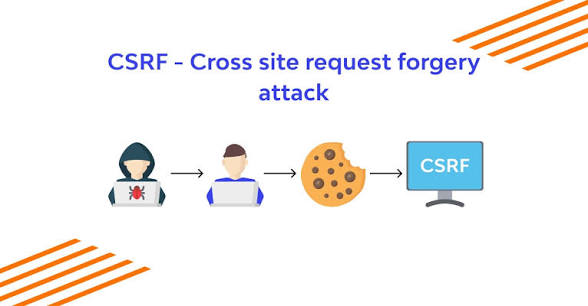
Cross-Site Request Forgery is an attack vector that tricks a web browser into executing an unwanted action on a trusted site where the user is currently authenticated. Unlike Cross-Site Scripting (XSS), which exploits the user's trust in a particular site, CSRF exploits the trust that a site has in a user's browser.
In the context of the recent Elementor vulnerability, the security boundary fails due to inadequate validation of request origins and missing state tokens, commonly known as anti-CSRF nonces. When an administrative user manages a WordPress site, their browser stores session cookies that identify them as an authorized user with high-level permissions. If the application does not verify that an incoming administrative request was intentionally submitted by that user, an attacker can construct a malicious payload that triggers the application to run commands on the user's behalf.
The attack vector unfolds through social engineering. An attacker crafts a special web page containing hidden forms or malicious JavaScript designed to send a background request to the victim's WordPress site. The attacker then lures the site administrator to visit this malicious page—perhaps via a phishing email, a disguised link on a forum, or a compromised third-party website.
Once the administrator opens the crafted link, their browser automatically executes the concealed request. Because the administrator is logged in, the browser attaches their active session cookies to the request. Elementor processes the incoming command as legitimate, unaware that it was forged by an external third party.
The Payload: Rogue Account Creation and Total Site Takeover
The consequences of this specific flaw are severe, carrying a Common Vulnerability Scoring System (CVSS) severity rating of 8.8 out of 10.0. The primary payload executed through this forged request involves the creation of a new user account equipped with full administrator rights, or the escalation of privileges for an existing low-level user.
Once an attacker successfully establishes a rogue administrator account, they gain unrestricted control over the target WordPress environment. The implications of total site compromise include:
- Arbitrary Code Execution: Administrators can install, modify, or delete any plugin or theme. Attackers frequently upload custom PHP webshells to maintain persistent access even if the original vulnerability is patched later.
- Data Exfiltration: Attackers can export sensitive customer records, stored payment details, personally identifiable information (PII), and proprietary corporate data.
- Malvertising and SEO Spam: Compromised sites are frequently used to redirect legitimate visitors to malicious landing pages, serve crypto-draining scripts, or host thousands of spam pages designed to manipulate search engine rankings.
- Supply Chain Risks: If the compromised site hosts downloads or software updates for other users, the attacker can replace legitimate files with trojanized malware, extending the breach to external networks.
Because the action originates from the legitimate administrator's browser, standard server logs initially show requests arriving from the real administrator's IP address, making early detection extremely difficult for non-automated security monitoring tools.
Why Nonce Management Remains a Software Development Hurdle
To understand why these flaws persist in popular software, one must look at how modern web plugins manage state and authentication. In a traditional web framework, actions that change the state of the system—such as adding a user, saving settings, or deleting content—must require a unique, unpredictable, and secret token attached to the submission. In the WordPress developer ecosystem, these cryptographic tokens are called nonces (numbers used once).
When a user loads an admin panel, WordPress generates a unique nonce tied to that specific session, user, and action. When the form is submitted, the backend verifies that the submitted nonce matches the expected value. If the nonce is missing or invalid, the request is rejected immediately.
Security flaws usually emerge in one of three ways during plugin development:
- Omission: The developer forgets to implement a nonce check on a specific REST API endpoint or AJAX action handler.
- Flawed Logic: The code checks if a nonce is present, but fails to stop execution if the check fails, returning a warning while still executing the underlying routine.
- Over-reliance on Capability Checks: Developers sometimes check if a user has administrative capabilities (
current_user_can('manage_options')) but forget to verify the nonce. While capability checks ensure that only admins can run a function, they offer zero protection against CSRF, because the admin's browser happily supplies administrative credentials automatically during the forged request.
For a plugin as massive as Elementor, which contains thousands of lines of JavaScript and dozens of custom API endpoints to power its real-time builder canvas, maintaining complete nonce coverage across every single routine requires rigorous static analysis and constant auditing.
Mitigation Strategies for Administrators and Site Owners
Given the critical nature of this vulnerability, web administrators who utilize Elementor must take immediate steps to secure their infrastructure.
1. Update Immediately
Software updates remain the single most effective defense against known application vulnerabilities. Site owners should immediately review their WordPress dashboard and update the Elementor plugin to the latest patched version released by the development team. If automatic updates are disabled, administrators should enable them for core plugins to minimize the window of exposure for future zero-day threats.
2. Audit Existing User Accounts
Site managers should inspect the WordPress users table for unfamiliar accounts, particularly those assigned the Administrator role. Look for newly created profiles with randomized usernames, unusual email domains, or creation timestamps that correspond with unexpected network activity.
3. Implement Strict Browser and Web Application Firewall (WAF) Rules
Deploying a Web Application Firewall, such as Cloudflare, Sucuri, or Wordfence, can mitigate CSRF attempts by detecting unusual request patterns, inspecting HTTP referrer headers, and blocking known exploit payloads before they reach the backend application server.
4. Practice Session Hygiene and Administrative Isolation
Site administrators should avoid browsing the general web or clicking links in emails while logged into high-privilege WordPress accounts. Using dedicated, isolated browser profiles or incognito sessions exclusively for website management significantly reduces the risk of accidental CSRF execution.
The Broader Context: Protecting the WordPress Ecosystem
The discovery of this high-severity flaw in Elementor underscores the inherent security trade-offs of modern web design. While page builders have lowered the barrier to entry for content creation, they have simultaneously increased the attack surface of millions of websites.
As open-source ecosystems continue to grow, security must move from an afterthought to a core component of the software development lifecycle (SDLC). Automated static application security testing (SAST), regular third-party code audits, and active bug bounty programs are essential investments for developers building tools that support millions of digital storefronts and corporate entities. For end-users and enterprise IT teams, maintaining strict patch management protocols and zero-trust administrative workflows remains the best defense against an ever-evolving threat landscape.